Showing posts with label OS. Show all posts

Friday, October 14, 2011

How to Install IIS7 on MS Windows Server 2008

How to Install IIS7 or Install Web Server on MS Windows Server 2008 If you are installing Infor10 SyteLine ERP. If you don't install IIS you will can't be run the report and client also can't log in because SyteLine need webserver to run Web Config below step will help you to install iis7 on MS Windows Server 2008

1.Go to Server Manager and Select on Web Server (IIS)

2. Click Next
3. Select Role Service .Follow by below picture as well.

4.Click Next again after that click install button.
5.Waiting untill Installation Successed.
6.Don't forget Register aspnet_iis.exe (recoment .net framwork 4.0) .
   Make sure, Already install .net framwork4.0.


Thursday, September 15, 2011

Windows Server 2008 : Enable multiple Remote Desktop session per user.

Windows Server 2008 : Enable multiple Remote Desktop session per user.
If you are finding the solution or how to enable multiple Remote Desktop to Winodw Server 2008.
I'd like to propose the solution for enable multiple Remote Desktop.
1.Start -> regedit
2.Check Out the following registry key
HKEY_LOCAL_MACHINE\System\currentControlset\Control\TerminalServer
3.If the fSingleSessionPerUser value.The possible values for this setting are as follows:
0x0 allow multiple sessions per user
0x1 force each user to a single session
5. Save this
6.Restart.

Tuesday, August 30, 2011

Solution : Parser Error in browsing ASP.NET

If you have found the error and the message display same below so i have solution.

An error occurred during the parsing of a resource required to service this request
Parser Error
Description: An error occurred during the parsing of a resource required to service this request. Please review the following specific parse error details and modify your source file appropriately.

Cause : We have changed the some companent name in that form.


Solution : Right Clickk on Project after that Click Rebuild . same picture below.


Saturday, August 27, 2011

free download software Antivirus for windows7

Free download 30 day software Antivirus for windows7

My Idea for Webroot Antivirus
              Price : Pass $16.65 per year if compare with Norton Antivirus cheaper ,Norton around $49.99 per year and limited of norton is pc or laptop ram less than 512 Mb very slow.
              Performance : Pass . used the resource very less.  
          

Webroot® Antivirus with Spy Sweeper
  • Webroot Antivirus Computer Software Highlights
  • Award-winning antivirus technology provided by Sophos®. With 56 VB100 certifications, it's among the best in the business! *
  • Includes award-winning Spy Sweeper®, proven to find and remove more spies than any other antispyware technology.
  • Effective, easy-to-use, real-time virus protection from the most dangerous Internet threats
  • 360 degrees of protection—blocks, detects and removes threats
  • Great value and comprehensive antispyware and antivirus protection

Minimum System Requirements

  • Windows XP 32 bit, SP2, SP3
  • Windows Vista® 32 bit (all Editions)
  • Windows Vista SP1, SP2 32 and 64 bit (all Editions)
  • Windows® 7 32 and 64-bit (all Editions)
  • Windows 7 SP1 32 and 64 bit (all Editions)
  • 300 MHz processor (minimum),  1GHz (recommended on Windows Vista and Windows 7)
  • 300 MB hard drive space
  • 256 MB RAM, 2GB (recommended on Windows Vista and Windows 7)
  • Internet Explorer 6.0 or higher, FireFox 3.0 or higher

Tuesday, August 23, 2011

pptx viewer converter software

Program for read *.pptx or anybody know that is powerpoint pptx converter tool.You can't read the *.pptx file because your MS office lower or less than MS office 2007 so if you want to read this file you should download powerpoint pptx converter .

Link to download:Free download powerpoint pptx converter (MS Office Viewer 2007)
http://www.microsoft.com/download/en/details.aspx?id=6

Wednesday, August 10, 2011

วิธีแก้ปัญหาเครื่องคอมช้า ด้วย ccleaner

วิธีแก้ปัญหาเครื่องคอมช้า หรือ วิธีแก้ปัญหาเครื่องคอมค้าง หรือ วิธีแก้ปัญหาเครื่องคอมดับเอง Restart เอง ด้วย ccleaner
เพราะว่าเวลาใช้งานนานไปแล้ว ไฟล์ขยะต่าง ๆ ไม่เคยได้ถูกลบไปเลยนั้นทำให้พื้นที่ใช้งานน้อยลง และ ที่สำคัญจะทำให้การเข้าถึงไฟล์ช้าด้วย เปิดเครื่องคอมพิวเตอร์ใช้เวลานาน ใช้งาน Internet แล้ว รู้สึกว่ามันช้า และ ที่สำคัญอีกประการหนึ่งคือ เราใช้ ๆ เครื่องไปแล้วดับ บ่อย ๆ อาจเป็นเหตุผลคือ Drive C คุณเต็มก็เป็นไปได้ หรือก็รู้ว่า Drive C เต็ม หรือ Drive C Full แล้วต้องทำอย่างไรล่ะ


ผมแนะนำโปรแกรมนี้ครับ ccleaner ใช้ง่ายครับ สะดวก เร็ว ได้ผลดีครับ

หรือใครสนใจก็ไป Download Free ccleaner ได้ที่
Download CCleaner from FileHippo.com

Tuesday, July 19, 2011

วิธีแก้ปัญหา Configuration Error ,ASP.net

วิธีแก้ไข เรื่อง แก้ปัญหาเมื่อเรา run website ที่เราสร้างเสร็จแล้วด้วย ASP.Net เช่น http://www.chicroom5.com/ default.aspx


จากนั้นพบปัญหา website ไม่สามารถทำงานได้ ฟ้องว่า Configuration Error


แก้ไขโดย:


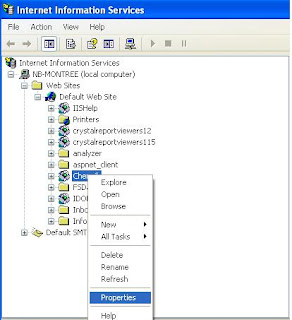
1.ไปที่ IIS

2.คลิก ขวาที่ website folder เลือก Properties


3.On the Directory Tab -> Click on Create Button.
4.Application name will display website name.


5.Test run again.


Saturday, May 28, 2011

Solution :The current time on this computer and the current time on the network are different.

Problem :The current time on this computer and the current time on the network are different.
Solution : Regarding to The time zone of your coputer and domain server are different so change the time zone to match with domain server
Solution Step :
1.Start -> Settings -> Control Panel
2. Double Click on Date and Time
3.Click On tap Time Zone
4. Choose the Time Zone to same the Domain Server.

Thank you.

Friday, April 8, 2011

วิธีแ้ก้ปัญหา Visual Studio Just-In Time Debugger Error

วิธีแ้ก้ปัญหา ,How to solve the Visual Studio Just-In_Time Debugger Error


I have found the error after i have installed the VS .Net 2005 on Windows XP3 and then this error will pop up all the time when i use my computer so i try to find out the solution so finally,I have found the solution follow by this below.

When you have encounter this error ,Plase try to below step:

1.Go to Event View -> System -> check for check what the error ,look at error source.
2. From No.1 , I think , you will encounter about .Net problem.
3. Check current version of .Net frame work on your machine.
4. Reinstall .Net Fram work relate to that on your machine.
5.Restart Computer.

Or If you have installed the Crystal Report 2008 so Should be reinstall Crystal Report 2008 againg.

Thank you.

Monday, November 15, 2010

Solution for correct Limited or no Connectivity wireless on Laptop windows xp,vista

Solution for correct " Limited or no Connectivity wireless " on Notebook ,Laptop used windows xp,vista

Hi , friend , I have found the problem can't connect to the network and then i have check the Network Icon and then i took double click on that i have found the message is " Limited or no Connectivity wireless " .

Solution : Reinstall the Wireless and then please sure, you uninstall the old driver first and then
restart Machine and install Wireless Driver on Laptop againts.

Thank you.

Tuesday, November 9, 2010

Free Solution : The Service did not respond to the start on Windows xp

error 1053 : The Service did not respond to the start or control request in a timely fashion

Problem : Because the system event log full .

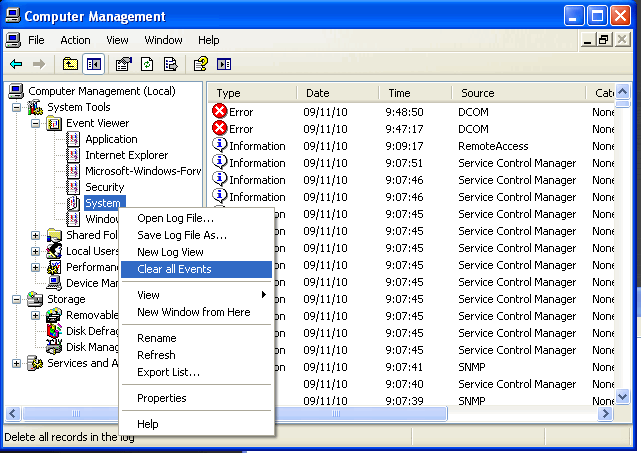
Solution : Clear the Event system log and application log and then restart the service against.


Monday, November 8, 2010

how to solve The system cannot find the file specified on windows xp

how to solveThe system cannot find the file specified on windows xp
Now , I have used the windows XP3 . I have found that when i try to start the one service .
so , I try to start that many time but the error have been same so that have root cause is
The Event Log is full so you must to delete or clear the System Log and Application Log and then restart the service against . I sured that worked.
below is method for clear that.

Thursday, October 28, 2010

how to install syteline on windows 7

How to install syteline ERP on windows 7 or Windows Server 2008

The installation step same Windows xp and Windows Server 2003 but specially for configuration.
after you will go to Configuration Wizard and You will found the problem about access denie so
I have the soultuion .take owner of Infor folder and IdoRequestServer and set everyone full control .Restart matchine and try again.
If you have any problem let me know.

Thanks.

Sunday, October 10, 2010

วิธีแก้ปัญหา : Window XP ,Windows could not start because the following file is missing or corrupt

Windows could not start because the following file is missing or corrupt\windows\system32\config\systemYou can attemp to repair this file be startingWindows setup using the original setup CD-ROMSelect 'r' at the first screen to start repair

ไม่ต้องตกใจไปนะครับยังมีทางแก้ไขโดยที่ ไม่ต้องลง Window ใหม่

ผมได้ทดสอบแล้วนะครับสำหรับ Windows xp2,xp3 ใช้งานได้ครับ ตามด้านล่างนี้เลยครับ

1. ใส่แผ่น window xp เข้าไปเหมือนกับเราเตรียมลง windows ใหม่ประมาณนั้น

2. ก็ให้เลือก หน้าจอ โดยกดปุ่ม R นะครับ

3. จากนั้น ระบบจะให้เราเลือกว่า เมนู ไหนที่เราต้องการทำงาน กดปุ่ม 1 ที่ key board

4. เป็นขั้นตอนสำคัญตามด้านล่างนี้ครับ


c:\cd windows\c:\windows\cd system32

c:\windows\cd system32\config\ren system system.old

c:\windows\cd system32\config\ren system.alt systemalt.old

c:\windows\c:\windows\ copy c:\windows\repair\system c:\windows\system32\config


สุดท้ายก็ Restart ครับ

......