Showing posts with label Database. Show all posts

Thursday, October 31, 2024

็How to repair table script sql by dbcc checktable

 USE KMx10

GO

ALTER DATABASE KMx10 SET SINGLE_USER WITH ROLLBACK IMMEDIATE;

GO

DBCC CHECKTABLE (N'job',REPAIR_REBUILD) WITH NO_INFOMSGS, ALL_ERRORMSGS;

GO

ALTER DATABASE KMx10 SET MULTI_USER;

Friday, January 12, 2024

Remove Tools SQL Server Reporting Service SSRS 2019 : How to revmove SSRS when not completed by Standard Methode

 Remove Tools SQL Server Reporting Service SSRS 2019 : How to revmove SSRS when not completed by Standard Methode

If you are problem on that so step i did below.

1) check in  add remove programe will not show ssrs .

2) check in service still there

3)  go to programe file and deted ssrs folder 

4) delete SSRS Service:


5) Install New Version.


Monday, June 27, 2022

how to check disable sql trigger by query


how to check disable trigger by query

SELECT name, is_disabled FROM sys.triggers where is_disabled = 1

Friday, July 8, 2011

Install MS SQL Express 2008


How to install MS SQL Express 2008 ?

If you are finding about the solution to install the MS SQL Express 2008.

It very easy and easier then SQL Express 2005.

First of all,Please download Installation file name "SQLEXPRWT_x86_ENU.exe".


Saturday, December 11, 2010

วิธีการ Install MS SQL Server 2005 (3)

วิธีการ Install MS SQL Server 2005 (3)

Okay. Let go to continue the installation Sql Server 2005 .Finally of SQL Installation .

11. Service Account . I'd like to advised you to select the option same the picture below.

Note: if you have found the error below . you must to do that same step number 11 but change the service name.



12. Authentication Mode : you should select hen Mixe mode is better because you can use 2 method for login to sql server .


13. fill in then Password. the policy same Window . you can used "Passw@rd" first after you change the it.


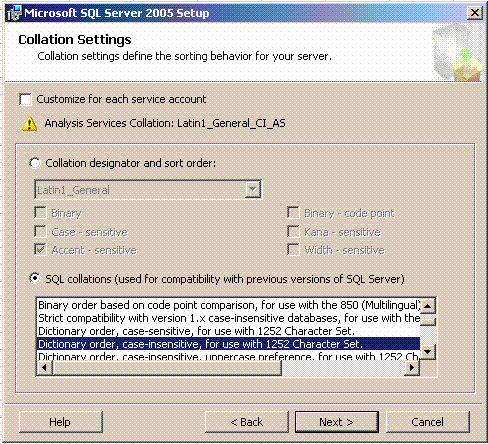
14. select the default Collation Settings .you can choosed same below.


15. Next


16.Click install Button for start "Install Microsoft SQL Server 2005 Setup"


17. Waitng utill the status display Setup Finished.


18.Completed installation Microsoft SQL Server 2005 Setup.


Completed the Install MS SQL Server 2005 .Thank you for your visit. next time i will write the configure for used the MS SQL Server 2005 advance setup.
I have writed this blog because i want to share idea for everybody and i'd like to see everybody share too. Thank you.

Hope you enjoy my blog. Krab.

Thursday, December 9, 2010

วิธีการ Install MS SQL Server 2005 (2)


วิธีการ Install MS SQL Server 2005 (2)

Okay , Let to continue to Install MS SQL Server 2005 or Install MS SQL Express

7.The Microsoft SQL Server 2005 Setup check the system configuration so may be you have found the error .all most the error about requirement of hard ware and need to your windows xp or other os shoud be install the iis server first so you can install the iis from Component of window included in the CD Installation . finally the status must be display "Success" . after that click the Next button for go to the next step.


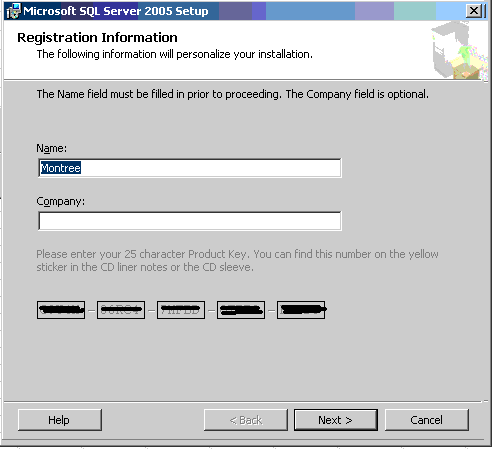
8. the Program promt for need you fill in the CD key and name.if you finish that after that click Next.


9.Choose the MS SQL Server 2005 Component you need to install .basicly choose sam the below shoud be Okay for the basicly becauase the reporting servic not used for the basicly that useful when you need to do about BI.


10. Choose the instance name meaning is your name of server or other you need to install one machine but need to install many instance you can select on the "name instance " and then fill in the server name follow by your require after that click on the button next.


วิธีการ Install MS SQL Server 2005 (1)


วิธีการ Install MS SQL Server 2005 Or How to Install MS SQL Server 2005
Hi, Today is holiday so i have time for write the step for install sql server 2005 and Sql server express ,Okay ,Let go . Below is step

1. Restart your machine first.
2. Insert the CD or DVD Program to Reader or go to path of program Install MS SQL Server 2005 and duble clike on Setup.exe
3.the program will Display screen below for confirm you about the agreement .the finally you should Tick the Accept on the "I accept the licensing terms and condition"


4. Show the picture after Tick on that box and then you must to click on the Next Button >>


5. MS SQL Server 2005 will check the component so you can click for next step


6. MS SQL Server 2005 ready to Installation .


Saturday, November 27, 2010

วิธีใช้งาน visual Basic 2005 กับ ฐานข้อมูล SQL Server 2005


วิธีใช้งาน visual Basic 2005 กับ ฐานข้อมูล SQL Server 2005
เมื่อกี่ไปเห็นที่ Google Guru มีคนถามถึงเรื่องนี้งั้นผมขอ แชร์ด้วยคนนะครับ

สร้าง connection ก่อนครับ

Module conndb

Public SLDBconnection As String = ReadINI.INIRead(Path.GetFullPath(".") & "\dbini.ini", "APPCONFIG", "SLDBconnection", "")


End Module
-----------------------------------------------------------------------------
ส่วนใน DBini file นั้นผมเขียนไว้ประมาณนี้ครับ


[APPCONFIG]
SLDBconnection = Data Source=nb-montree;database=Database;uid=sa;pwd=sa


usr=
pwd=

----------------------------------------------------------------

ต่อไป Class สำหรับอ่าน ini ครับ

Public Class ReadINI
#Region "API Calls"
' standard API declarations for INI access
' changing only "As Long" to "As Int32" (As Integer would work also)
Private Declare Unicode Function WritePrivateProfileString Lib "kernel32" _
Alias "WritePrivateProfileStringW" (ByVal lpApplicationName As String, _
ByVal lpKeyName As String, ByVal lpString As String, _
ByVal lpFileName As String) As Int32
Private Declare Unicode Function GetPrivateProfileString Lib "kernel32" _
Alias "GetPrivateProfileStringW" (ByVal lpApplicationName As String, _
ByVal lpKeyName As String, ByVal lpDefault As String, _
ByVal lpReturnedString As String, ByVal nSize As Int32, _
ByVal lpFileName As String) As Int32
#End Region

Public Shared Function INIRead(ByVal INIPath As String, _
ByVal SectionName As String, ByVal KeyName As String, _
ByVal DefaultValue As String) As String
' primary version of call gets single value given all parameters
Dim n As Int32
Dim sData As String
sData = Space$(1024) ' allocate some room
n = GetPrivateProfileString(SectionName, KeyName, DefaultValue, _
sData, sData.Length, INIPath)
If n > 0 Then ' return whatever it gave us
INIRead = sData.Substring(0, n)
Else
INIRead = ""
End If
End Function

End Class
---------------------------------------------------------------------
จากนั้นก็ลงมือสร้าง ฟอร์ม หน้าตาแบบนี้ แล้วก็ประยุคต์ source code ดูนะครับ


Public Class frmitem


Private Sub btnsearch_Click(ByVal sender As System.Object, ByVal e As System.EventArgs) Handles btnsearch.Click
Dim connection As New SqlConnection
Dim da As SqlDataAdapter
Dim ds As DataSet = New DataSet

With connection
If .State = ConnectionState.Open Then .Close()
.ConnectionString = SLDBconnection
.Open()
End With


Dim command As SqlCommand = New SqlCommand("STPxListItem", connection)
command.CommandText = "Exec STPxListItem '" & txtsitem.Text & "'"
command.Connection = connection 'Active Connection


da = New SqlDataAdapter(command)
da.Fill(ds, "litem")


If ds.Tables("litem").Rows.Count <> 0 Then

With grdview
.ReadOnly = True
.DataSource = ds.Tables("litem")
End With

Else

grdview.DataSource = Nothing
End If


End Sub
End Class

Monday, November 15, 2010

ms sql server 2005 restore failed because the database is in use.

Ms sql server 2005,Express,2008 restore failed on ERP Syteline Database because the database is in use. Hi, Friend.If you looking for solution for restore database with out error same below

" system.data.sqlclient.sqlerror:exclusive access could not be obtained because the database is in use. "


from message above i sure , you have been restoring the database while that have the application is in use so i have script for find out the problem .

1. Log in to sql server -> create new query -> key in the script
use Database name
exec sp_who -- if you need to check who have been using the database.
From a picture . Sured, the database is in use.


2. Stop Service of Application to use the MS SQL server 2005 | Express | 2008


3. Run Restore against . I have sured , you can restore the database MS SQL 2005 ,Express , 2008


Tuesday, November 9, 2010

How to create schedule backup sql server 2005 (Cont 2)

How to create | Creating | Build | schedule backup sql server 2005 | sql server 2008

6. you can Right Click or Double on the Task below.
if you Right click , You must to select the Edit menu for in put the Backup Detail .


7. Fill in and Key in the input deatil
Back up type : Full if you want to backup every thing you can select other backup type by Drop Down Lit.
You don't forget to choosed the Database name ,You want to backup .


8. Setup the path for keep the backup file and Last name of Backu file (*.bak)
Finish the input the backup database detail.


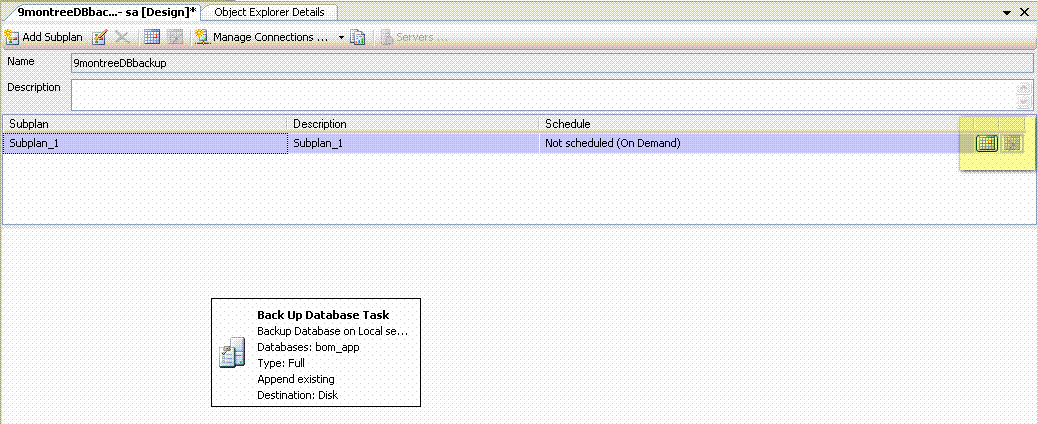
9. Go to Step ,Set up the Schedule Time for the Backup
Click on My High Light in the picture.


10. Key in the Job Schedule Detail.


11. Click Save for you confirm the Schedule Time.


12. When you finish the create the Schedule Backup database so you will see same below.


13. You can waiting untill the Schedule follow by you set up or Right Click -> Exec on the Job Plan and If that finish ,You will see the Message Box below .


14. Go to the Path for keep the database backup file .

You will see the backup database file Databasename_Backup_yyyymmddd.bak


Hope you enjoy on My Blog. See you again next Topic.


Back To the First Page

Monday, November 8, 2010

How to trust Database sql server 2005

How to trust Database sql server 2005,Express
Okay,I must to used the SQL script when you have to restore the database from the database backup from aother Machine so You must to run the script for change some thing to your machine .

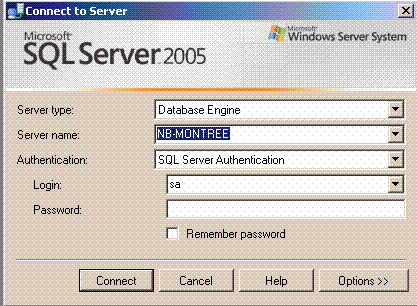
1. Log in to the SQL Server .
2. Open the new Query and then copy below .

alter database [your database name]
set trustworthy ON;


Plase waiting for the Compleated message .

Thanks.

Sunday, November 7, 2010

Solution for solve the problem Restore Database failed for Sql server 2005 ,SQL Express วิธี แก้

การ วิธี แำก้ How to Restore Database SQL Server 2005,SQL Express ?
I have found the error
"Restore failed for Sql server 2005 ,2008,SQL Express
Additional information.
system.data.sqlclient.sqlerror :The backup set holds a backup of a database other than the existing.
" the picture below when i try to restore the database from my database backup ,I have forgot tell you to My database server is version SQL Server 2005 but you can apply that to used to SQL Server 2008,MS SQL Express .
Root cause of problem: The system warning that for inform you to unsure you are working about Restore database while you have the existing database so you can follow to my Step.

Message Error.


Restore failed for Sql server 2005 ,2008,SQL Express
Additional information.
system.data.sqlclient.sqlerror :The backup set holds a backup of a database other than the existing.


Solution : After the you found the message . you not close the the form because you can you to Options Tab by Click Left on that and then you must to Tick on the Restore Options : Tick "Overwrite the existing database" and then Click Ok .


Waiting untill Program show below.


End of Procedure.

Friday, November 5, 2010

How to create the schedule backup sql server 2005 ,2008

How to set auto schedule backup sql server 2005 | sql server 2008

Hi,Friend .I'd like to present about how to create the schedule database backup for sql server 2005,2008 so you can follow my step.

1. Log in the Sql server by user and then user should be have to grant the Admin permission.


2. Clikc on the Management Folder and then you will see the folder name is " maintenance plans " and then Right Click and choosed the "New maintenance Plan"


3. Key in the Job's Name follow by you want that and then Click OK.


4. Left Click and Drage the Back up Database Task to the working area.


5. You have seen the Back up Database Task from your Drag just now .


Click Here to See The Next Page

Thursday, November 4, 2010

How to Maintenance SQL Server 2005

วิธี การ Maintenance SQL Server 2005 | Maintenance SQL Server 2008 | SQL 2005 Express | Sql management Studio

How to SQL Server Maintenance
SQL Server statistics that are out of date and tables and indexes that are significantly
fragmented adversely affect system performance. You can monitor their condition and take
steps to enhance their performance.


Statistical Information


SQL Server uses statistical information about the distribution of values in a column to
determine the optimal strategy for evaluating a query. Distribution statistics help the
system estimate how efficient an index would be in retrieving data associated with a key
value or range specified in the query.
As the data in a column changes, index and column statistics can become out-of-date,
affecting query performance. The statistics should be refreshed anytime significant
numbers of changes to keys occur in the index.


You can use the dbcc show_statistics statement to generate a report on the distribution
statistics for an index. The statements in this section use the following syntax:
dbcc show_statistics (table_name, index_name)
In SQL Query Analyzer, with the application database selected as the current database,
the following statements show the current statistics and the last time statistics were
updated for primary keys in major tables:
dbcc show_statistics (item, pk_item)
dbcc show_statistics (customer, pk_customer)
dbcc show_statistics (ledger, pk_ledger)
dbcc show_statistics (matltran, pk_matltran)
dbcc show_statistics (matltran_amt, pk_matltran_amt)
dbcc show_statistics (journal, pk_journal)
dbcc show_statistics (ledger_all, pk_ledger_all)
The results indicate the selectivity of an index (the lower the density returned, the higher
the selectivity) and provide the basis for determining whether an index is useful in
optimizing queries.
See SQL Server Help for dbcc show_statistics and other DBCC (Database Console
Commands) statements.


Update Statistics

Use the Transact-SQL statement UPDATE STATISTICS if
• A process suddenly takes much longer than usual to run
• There is a significant change in the key values in an index


• A large amount of data in an indexed column has been added, changed, or removed,
or the table has been truncated using the TRUNCATE TABLE statement and then
repopulated.
We recommend that you update statistics nightly or weekly.
This example updates the statistics for all indexes on the customer table.
UPDATE STATISTICS customer
To update statistics for all tables in the in the current database, you can run the SQL Server
stored procedure sp_updatestats, which uses UPDATE STATISTICS:
EXEC sp_updatestats
For more information, see SQL Server Help for UPDATE STATISTICS and
sp_updatestats


Fragmentation Information

Fragmentation occurs through data modifications (INSERT, UPDATE, and DELETE). For
queries that scan part or all of a table, this fragmentation can cause additional pages to be
read, adversely affecting performance.
You can use the Transact-SQL DBCC SHOWCONTIG statement to display fragmentation
information for the data and indexes of a specified table.
To determine whether a table is heavily fragmented, use the following syntax in SQL Query
Analyzer, with the application database selected as the current database:
DBCC SHOWCONTIG (table_name)
In the result set, the value of Logical Scan Fragmentation gives an indication of the table's
fragmentation level. The value should be close to zero, although a value from 0% through
10% may be acceptable.
To show in a grid an abbreviated result set for every index on every table, use:
DBCC SHOWCONTIG WITH TABLERESULTS, FAST
To show the full result set for every index on every table, use:
DBCC SHOWCONTIG WITH TABLERESULTS, ALL_INDEXES
For more information, see SQL Server Help for DBCC SHOWCONTIG.


Defragment Indexes

We recommend that you rebuild your table indexes on a weekly basis if possible.
The Transact-SQL DBCC INDEXDEFRAG statement defragments indexes of a specified
table, improving index-scanning performance.
DBCC INDEXDEFRAG (database_name, table_name, index_name)
The script below uses DBCC INDEXDEFRAG and DBCC SHOWCONTIG to defragment
all indexes in a database fragmented above a declared threshold of 30 percent. The script
is from Microsoft’s Transact-SQL Reference, copyright © 2004 Microsoft Corporation, One
Microsoft Way, Redmond, Washington 98052-6399 U.S.A.; all rights reserved.
Note that you must specify a database before you run the script.
/*Perform a 'USE ' to select the database in which to run
the script.*/
-- Declare variables
SET NOCOUNT ON
DECLARE @tablename VARCHAR (128)


DECLARE @execstr VARCHAR (255)
DECLARE @objectid INT
DECLARE @indexid INT
DECLARE @frag DECIMAL
DECLARE @maxfrag DECIMAL
-- Decide on the maximum fragmentation to allow
SELECT @maxfrag = 30.0
-- Declare cursor
DECLARE tables CURSOR FOR
SELECT TABLE_NAME
FROM INFORMATION_SCHEMA.TABLES
WHERE TABLE_TYPE = 'BASE TABLE'
-- Create the table
CREATE TABLE #fraglist (
ObjectName CHAR (255),
ObjectId INT,
IndexName CHAR (255),
IndexId INT,
Lvl INT,
CountPages INT,
CountRows INT,
MinRecSize INT,
MaxRecSize INT,
AvgRecSize INT,
ForRecCount INT,
Extents INT,
ExtentSwitches INT,
AvgFreeBytes INT,
AvgPageDensity INT,
ScanDensity DECIMAL,
BestCount INT,
ActualCount INT,
LogicalFrag DECIMAL,
ExtentFrag DECIMAL)
-- Open the cursor
OPEN tables
-- Loop through all the tables in the database
FETCH NEXT
FROM tables
INTO @tablename
WHILE @@FETCH_STATUS = 0
BEGIN
-- Do the showcontig of all indexes of the table
INSERT INTO #fraglist
EXEC ('DBCC SHOWCONTIG (''' + @tablename + ''')
WITH FAST, TABLERESULTS, ALL_INDEXES, NO_INFOMSGS')
FETCH NEXT
FROM tables


INTO @tablename
END
-- Close and deallocate the cursor
CLOSE tables
DEALLOCATE tables
-- Declare cursor for list of indexes to be defragged
DECLARE indexes CURSOR FOR
SELECT ObjectName, ObjectId, IndexId, LogicalFrag
FROM #fraglist
WHERE LogicalFrag >= @maxfrag
AND INDEXPROPERTY (ObjectId, IndexName, 'IndexDepth') > 0
-- Open the cursor
OPEN indexes
-- loop through the indexes
FETCH NEXT
FROM indexes
INTO @tablename, @objectid, @indexid, @frag
WHILE @@FETCH_STATUS = 0
BEGIN
PRINT 'Executing DBCC INDEXDEFRAG (0, ' + RTRIM(@tablename) + ',
' + RTRIM(@indexid) + ') - fragmentation currently '
+ RTRIM(CONVERT(varchar(15),@frag)) + '%'
SELECT @execstr = 'DBCC INDEXDEFRAG (0, ' + RTRIM(@objectid) + ',
' + RTRIM(@indexid) + ')'
EXEC (@execstr)
FETCH NEXT
FROM indexes
INTO @tablename, @objectid, @indexid, @frag
END
-- Close and deallocate the cursor
CLOSE indexes
DEALLOCATE indexes
-- Delete the temporary table
DROP TABLE #fraglist
GO


วิธี Maintenance SQL Server 2005

Tuesday, November 2, 2010

How to write command line | Script backup database sql Server 2005

How to write command line | Script backup database sql Server 2005

Start from create the BAT File first. Open the Notepad Program
Copy the Script below to Notepad Program and then you must to change on Highlight .


@ECHO OFF

@echo.
@echo +++ Begining Backup DB +++
sqlcmd -Slocalhost -Usa -Psa -i"bk_app.sql" -b
IF %ERRORLEVEL% NEQ 0 GOTO err_bkp_failed

:success
rem cls
@echo.
@echo.
@echo.
@echo.
echo +++ Database Backup successful +++
pause
exit

:err_bkp_failed
@echo Database Backup Failed
pause
===================================================================

Next Step,

Write the SQL Script , I have writed the script to control the part and naming of file so you must to change for highlight.


declare @ty char(4)
declare @tm char(2)
declare @td char(2)
declare @tbkname char(50)

set @ty = '';
set @tm = '';
set @td = '';

set @ty = convert(char,year(getdate()))
set @tm = convert(char,month(getdate()))
set @td = convert(char,day(getdate()))
set @tbkname = 'D:\SLBACKUP\KLK_DBBACKUP\' + @ty + rtrim(@tm) + @td + '_app.bak'
--print @tbkname
BACKUP DATABASE [databasename] TO DISK = @tbkname WITH NOFORMAT, NOINIT, NAME = N'databasename-Full Database Backup', SKIP, NOREWIND, NOUNLOAD, STATS = 10

GO

And you don't forget to save the Last name of Sql Script to *.SQL but you develop on SQL Server the defult is *.sql .

when you need to used that you can duble click on BAT file and you can check the result on Backup Path and the peple usefull to BAT file backup for SQL 2005 Express becauase SQL Express it don't have Schedule Backup.


=====================================

Tuesday, October 26, 2010

How to Rebuilding index or Reindex SQL Server 2005,2008

How to Rebuilding index or Reindex SQL Server 2005,2008

Hi,Friend. I'd like to display step for work about Rebuilding index or Reindex SQL Server 2005,2008 . I have created that to two method for that Capture Screen and Command Line.

Capture Screen

1. Log in to SQL Server .


2. Click the Database Folder and then select the Database Name for reindex and select Table Name and choose the Indexs same picture below.


3. Right Click at Indexs picture below


4.Waiting untill the Reindexs Forms display.


5. Click OK

Finish to Rebuild the index or Reindex sql 2005 , Easy Right ?

May be peple need to command line for Rebuild the index or Reindex sql 2005 because That is very fast for work . I think so . you can follow by below.

Command Line or SQL Script


use demo -- Change Database name
--All first DBCC CHECKDB
exec sp_dboption N'demo', N'single', N'true' --Set database option to single user
DBCC DBREINDEX ('tpstsalhd', '', 70) -- Select the Table name for that.

exec sp_dboption N'demo', N'single', N'False' --Set database option to Multi user

--Finally Check Result Run Sql Script Below.

dbcc showcontig(tpstsalhd)

Thank you for your visit my blog.

การ Reindex คืออะไร ทำไปทำไม นั้นผมอธิบายไงดี อันดีในความเข้าใจจากประสบการณ์
ผม ว่ามันก็เหมือนกับครั้งหนึ่งเรามีการจัดหนังสือในห้องสมุดไว้เป็นหมวดหมู่ อย่างดีแต่เปิดไปนานก็มีทั้งหนังสือใหม่ และหนังสือเก่าที่อ่านแล้วเก็บไม่เรียบร้อยฉะนั้นก็ต้องกมีการจัดเรียงกัน ใหม่เพื่อให้เวลาที่เราคนหา(Query) ทำได้เร็วขึ้นครับ นั้นก็เหมือนกันกับ ฐานข้อมูลเราต้องมีการจัดข้อมูลให้เป็นหมวดหมู่เหมือนกัน
ฉะนั้น เราจำเป็นต้องทำถ้าเราอยากให้การค้นหาข้อมูลเร็วขึ้น ครับ
สามารถหาข้อมูลเพิ่มเติมได้ จาก SQL Programming หัวข้อเรือง Database Turning.


Wednesday, September 1, 2010

Install SQL 2005 Client Tools

How to install SQL 2005 Client Tools
ก็ไม่มีอะไรมากนะครับ แต่ก็ต้องถามตัวเองก็ว่าจะลงไปเพื่ออะไร
กวนไปป่าว ล้อเล่นนะครับ
ก็เราต้องการให้เราสามารถใช้ฐานข้อมูลที่เครื่อง Server ผ่านเครื่อง Client ได้
เมื่อ Install เสร็จอย่าลืมเปิด Port ให้เรียบร้อยนะครับ
ส่วนวิธีการ Install มีดังนี้ครับ
1. Duble Click Setup file.
2. Next ไปเลื่อย ๆ จนถึงหน้า Component to Install
3. ก็ให้กดปุ่ม Advance
4. ก็ให้เลือก connectivity components ตัวเดียว
5. จากนั้นก็ Next ไปจนจบขั้นตอนเลยนะครับ

Wednesday, June 16, 2010

วิธีการ Uninstall MS SQL Server 2005 ,Express ฉบับบสมบูรณ์

How to Uninstall SQL 2005 ,Express
We can't remove the SQL 2005 Application via Add Remove Program of Windows because the SQL have a lot of the system file so MS SQL Server 2005 create Software for uninstall included the CD Installation which you can access the files follow by the Step below.

เราไม่สามารถใช้ add remove program เพื่อทำการ Uninstall ได้นะครับ เพราะมันจะทำให้เราลง sql ซ้ำไม่ได้ เพราะจะทำให้ remove component ไม่หมดครับจะต้องใช้วิธีนี้ครับ ให้เข้าไปที่


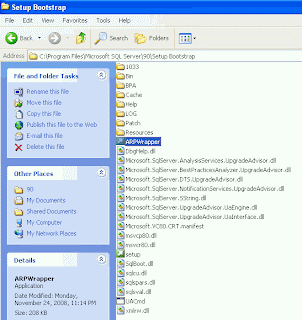
1. C:\Program Files\Microsoft SQL Server\90\Setup Bootstrap\ARPWrapper


2. Double Click ARPWrapper.exe

3. choose the component for uninstall , I'd like to advise you to select the component frist.

4.Click Next

5. So,Welcome to the Microsoft SQL Server Installation Wizard.

6.Click Next


7. System Config Check


8. Click Next


9. Display screen for Change or Remove Instance. for you choose so you choosed the Remove


10. select Remove


11.Next


12.Next


13. Confirm to Uninstall -> Click Remove


and then for another component you can work on same the methode above.