Expedited fixed Lead Time on Infor SyteLine
ถ้าคุณกำลังหาคำตอบว่า เจ้า Expedited Lead Time บน SyteLine ERP นั้นทำงานอย่างไร ผมจะอธิบายสั้นๆ นะครับ ผมยกตัวอย่าง Part ที่เราจะต้องทำการสั่งซื้อ โดยระบบ MRP จะมี Fixed Lead Time ใช้ในการคำนวณหาวันที่ในการเปิดสั่งซื้อ หรือในระบบเรียกว่า Release Date โดยถ้าเราใช้ MRP ในการประมวลผลจะไม่ได้เห็นการทำงานของ Expedited fixed Lead Time ถ้าต้องการใช้งาน จะต้องเปลี่ยนเป็นโหมด APS ก่อนครับ ขอแตกต่างคือ APS จะไม่ยอมให้ วัน Release Date ต่ำกว่าวันปัจจุบันได้ ดังนั้นเกิดอะไรขึ้นถ้า Release Date ต่ำกว่าวันปัจจุบัน โดยคำนวณจำ Fixed Lead Time ระบบก็จะไปมองที่ Expedited fixed Lead Time ต่อวันวันสั่งซื้อที่ด่วนที่เรากำหนดไว้คือเท่าไรและนำมาใช้คำนวณในการหากำหนดวันสั่งซื้อ แต่ถ้าคำนวณแล้วก็ยังไม่ได้อีกระบบ APS ก็จะ Forward หาวันที่เหมาะสมให้อีกครั้งแต่จะทำให้ Projected Date ขยับไปครับ ลองดูครับ....
Showing posts with label erp system. Show all posts
Showing posts with label erp system. Show all posts
Sunday, March 8, 2015


Saturday, February 15, 2014
MRP Conceptual & Scheduling
MRP Conceptual & Scheduling
เวลาที่ผมไปพบลูกค้าผมมักจะเจอคำถามบ่อยๆ ว่า MRP กับ Scheduling มันต่างกันอย่างไร จะตอบบแบบตามตำราก็เข้าใจยากอีก มาลองฟังคำตอบของผมดูนะครับ
MRP จะมองเรื่องปริมาณการใช้ สินค้าคงคลังหรือเรียกอีกอย่างว่าบริหาร Onhand ให้สอดคล้องกับความต้องการ หัวใจของ MRP คือ สินค้าคงคลังจะต้องถูกต้อง
Scheduling จะมองในเรื่องของ ลำดับขั้นตอนในการทำงาน และ ชั่วโมงการทำงานของเครื่องจักร หรือ ทรัพยากรคน หรือ เรามักเรียกมันว่า Resource / Resource Group นั้นเอง หัวใจของ Scheduling คือ จะต้องมี Cycle Time ที่ถูกต้อง และ จำนวนเวลาในการทำงานของในแต่ละ Resource ที่เป็นจริง เช่น ถ้าเครื่องเสีย แรงงานป่วย ก็จะต้องเข้ามาปรับปรุงข้อมูลในระบบด้วยเช่น ถ้าถามต่อว่าไม่ทำ Scheduling ได้ไหม ทำได้ครับ แต่ทุกๆ แผนกก็จะทำงานกันไม่สอดคล้องกันเหมือนมี สัญญาณนาฬิกา กันแบบ ทำให้การบริหารจัดการข้อมูลไม่สอดคล้องกัน
ฉะนั้น MRP เน้น Stock,Scheduling เน้น Time.
เวลาที่ผมไปพบลูกค้าผมมักจะเจอคำถามบ่อยๆ ว่า MRP กับ Scheduling มันต่างกันอย่างไร จะตอบบแบบตามตำราก็เข้าใจยากอีก มาลองฟังคำตอบของผมดูนะครับ
MRP จะมองเรื่องปริมาณการใช้ สินค้าคงคลังหรือเรียกอีกอย่างว่าบริหาร Onhand ให้สอดคล้องกับความต้องการ หัวใจของ MRP คือ สินค้าคงคลังจะต้องถูกต้อง
Scheduling จะมองในเรื่องของ ลำดับขั้นตอนในการทำงาน และ ชั่วโมงการทำงานของเครื่องจักร หรือ ทรัพยากรคน หรือ เรามักเรียกมันว่า Resource / Resource Group นั้นเอง หัวใจของ Scheduling คือ จะต้องมี Cycle Time ที่ถูกต้อง และ จำนวนเวลาในการทำงานของในแต่ละ Resource ที่เป็นจริง เช่น ถ้าเครื่องเสีย แรงงานป่วย ก็จะต้องเข้ามาปรับปรุงข้อมูลในระบบด้วยเช่น ถ้าถามต่อว่าไม่ทำ Scheduling ได้ไหม ทำได้ครับ แต่ทุกๆ แผนกก็จะทำงานกันไม่สอดคล้องกันเหมือนมี สัญญาณนาฬิกา กันแบบ ทำให้การบริหารจัดการข้อมูลไม่สอดคล้องกัน
ฉะนั้น MRP เน้น Stock,Scheduling เน้น Time.
Thursday, December 26, 2013
ERP CO-Product and By Product
วันนี้เราจะมาคุยกันเรื่อง CO- Product และ อะไรคือ By Product ถ้าใครอยู่ในวงการ ERP อยู่แล้วก็คงไม่ยากในการที่จะตอบว่าอะไรคืออะไร มันสำคัญมากในการสือสารระหว่างกัน เช่น ถ้าเราต้องการที่จะบอกว่าต้องการเศษวัสดุที่เหลือจากการผลิตเข้าคลัง แต่ถ้าเราบอกว่า By Product ถ้าคนที่เข้าใจคำนี้อยู่แล้วก็จะเข้าใจในทันที่ว่า การที่เราจะรับเศษวัสดุที่เหลือจากการผลิตนั้นเราเรียกว่า By Product อีกนิดครับ By Product ไม่ใช่ Scrap นะครับ By Product ยังสามารถนำกลับมาใช้ได้ แต่ถ้า Scrap จะต้องขายเป็นขยะไป งั้นมาถึง CO-Product บ้างครับ ถ้าเราต้องการ Re-Engineering Process ในการผลิตเช่น ขึ้นงานหนึ่งครั้งได้ชิ้นงานออกมาเป็น 2 รายการ ตัวอย่างเช่น ต้องการตัดเหล็กเส้น ขนาดยาว 30 cm และ 70 cm ขนาดเหล็กต่อหน่อยเท่ากับ 100 cm เห็นไหมครับการที่เราขึ้นงาน ตัด เหล็กเส้น 30 cm เรายังได้เหล็กเส้น 70 cm ด้วยเพื่อไปทำการดัดต่อไป อีกตัวอย่างที่พอจะอ้างอิงได้เช่น เราต้องการผลิตกระป๋อง และกระป๋องเมื่อผลิตเสร็จจะถูกแยกออกเป็นเกรด A,B,C ได้อีก จะเห็นว่า ABC CO-Product กันอยู่ครับ
พอเข้าใจไหมครับ
พอเข้าใจไหมครับ
Thursday, November 15, 2012
การคำนวณ Landed Cost ใน SyteLine ERP
เป็นการบันทึกต้นทุนแฝงให้กับสินค้าที่บริษัทซื้อมาจากต่างประเทศ ส่วนใหญ่เราจะใช้ในกรณีนี้ ซึ่งจะมีผลทำให้ต้นทุนสินค้า เพิ่มขึ้นหรือลดลง เช่น ค่าขนส่งขาเข้า ค่าภาษีศุลกากร ค่าธรรมเนียมต่าง ๆ เป็นต้น
โดยโปรแกรมจะมีให้เลือก อยู่ 2 แบบ คือ
1) ตามจำนวนเงิน เป็นการปันส่วนต้นทุนให้สินค้าแต่ละตัว
ตามมูลค่าของสินค้าหลังหักส่วนลดสินค้าแล้ว
ตัวอ่าง ปันส่วนตามจำนวนเงิน
โปรแกรมจะคำนวณจาก จำนวนเงินที่กำหนด(Fright) x จำนวนเงินของรายการที่เลือกคำนวณ / จำนวนเงินรวม
จากตัวอย่างในรูป 2,000 x 25,000/50,000 = 1,000
เพราะฉะนั้นรายงานในบรรทัดนี้จะได้ ค่า Landed Cost ของค่า Fright เท่ากับ 1,000 บาท
2) ตามอัตรา % เป็นการปันส่วนต้นทุนให้สินค้าแต่ละตัว ตามอัตรา % ที่กำหนด
Friday, November 9, 2012
การวางแผนทรัพยากรกิจการ (Enterprise Resources Planning)
การวางแผนทรัพยากรกิจการ (Enterprise
อะไรคือ ความสำเร็จอของการ Implement ERP System
อะไรคือ ความสำเร็จอของการ Implement ERP System ?
เคยมีคำถามนี้ในใจกันบ้างหรือเปล่า ว่า อะไรคือ ความสำเร็จของการ Implement ERP System.
คำถามนี้จะถามได้ใน 2 เวลา คือ ตอนที่คิดจะซื้อ กับ ติดตั้งเสร็จแล้ว อย่าเพิ่งงงไปนะครับ
มันคือเรื่องจริงบางครั้ง เมื่อ Implement หรือ ติดตั้งเสร็จแล้ว ยังมีอาการงง ๆ กันอยู่ว่าเสร็จแล้วเหรอะ
นั้นแหละครับ ลองกลับไปดูนะครับ ที่ Implement เสร็จ นั้นคือ ทำอะไรได้บ้าง ตอบคำถามตอนที่คิดครั้งแรกได้หรือเปล่า งั้นมาลอง ดูความคิดผมนะครับ ถ้า Implement เสร็จแบบ Full Option ของ ERP ในบ้านเรา จะต้องทำอะไรได้บ้าง
1) Production Module
เคยมีคำถามนี้ในใจกันบ้างหรือเปล่า ว่า อะไรคือ ความสำเร็จของการ Implement ERP System.
คำถามนี้จะถามได้ใน 2 เวลา คือ ตอนที่คิดจะซื้อ กับ ติดตั้งเสร็จแล้ว อย่าเพิ่งงงไปนะครับ
มันคือเรื่องจริงบางครั้ง เมื่อ Implement หรือ ติดตั้งเสร็จแล้ว ยังมีอาการงง ๆ กันอยู่ว่าเสร็จแล้วเหรอะ
นั้นแหละครับ ลองกลับไปดูนะครับ ที่ Implement เสร็จ นั้นคือ ทำอะไรได้บ้าง ตอบคำถามตอนที่คิดครั้งแรกได้หรือเปล่า งั้นมาลอง ดูความคิดผมนะครับ ถ้า Implement เสร็จแบบ Full Option ของ ERP ในบ้านเรา จะต้องทำอะไรได้บ้าง
1) Production Module
- การรับ Customer Order,Forecast เข้าระบบ,กำหนดราคาขาย,การทำใบเสนอราคา
- มีการกำหนด สูตรในการผลิต
- จากนั้นระบบจะทำการ วางแผน สั่งซื้อวัตถุดิบ และ วางแผนผลิตให้ เราเรียกกระบวนการนี้ว่า MRP Process โดยที่ถ้าไม่ใช้ MRP จะทำมาคำนวณเอง ซึ่งไม่ง่ายครับ คุณ มีสินค้าในคลังเป็นจำนวนมาก ๆ
- สามารถดู สินค้าคงเหลือ ประวัติการใช้ Material ในแต่ละรายการได้
- รองรับการทำงานสำหรับ Inventory Transaction ต่าง ๆ ได้ เช่น Goods Receive,Job Receipt....
- การรายงานผลิต และ สามารถติดตามสถานะของงานในแต่ละขั้นตอนได้ ว่าทำถึงไหนแล้ว
- สามารถทราบต้นทุนผลิตของสินค้าในแต่ละ Lot การผลิตได้ ในทันที
- ทำ ข้้นตอนของ AR ในระบบ เริ่มตั้งแต่ เปิด Invoice จนถึง AR Payment Posting.
- ทำ ขั้นตอนของ AP ในระบบ เริ่มตั้้งแต่ Create Voucher ใบสำคัญจ่าย จนถึง AP Paymnet Posting
- ทำ Fixed Asset ในระบบ
- บันทึกสินค้า ต้นงวด ปลายงวดในระบบ กรณีปิดแบบ Periodic
- ตรวจสอบและ Post GL
- ออก งบทดลอง และ ออกงบการเงินในระบบ
Friday, September 7, 2012
How to calculate Shrink Factor in SyteLine ERP
How to calculate Shrink Factor in SyteLine ERP
Qty Requirem for Bom Level under Item Shrink factor setup
= Quantity Needed / ( 1 – shrinkage factor) .
Saturday, September 1, 2012
รับวาง ระบบ และ Support SyteLine ERP
รับวาง ระบบ และ ดูแลระบบ(Support) SyteLine ERP
ถ้าบริษัทไหน ที่กำลังพบปัญหาว่า อยากจะนำระบบ ERP มาใช้จะต้องเตรียมตัวอย่างไรบ้าง หรือ นำมาใช้แล้วใช้งานยังไม่เต็มประสิทธิภาพ ติดต่อมาที่ผมและทางทีมงาน ได้ครับ เรายินดีรับให้คำปรึกษาครับ
ส่ง Mail มาคุยกันได้ที่ mkrutphun@gmail.com
ขอบคุณครับ
มนตรี ครุฑพันธ์
ถ้าบริษัทไหน ที่กำลังพบปัญหาว่า อยากจะนำระบบ ERP มาใช้จะต้องเตรียมตัวอย่างไรบ้าง หรือ นำมาใช้แล้วใช้งานยังไม่เต็มประสิทธิภาพ ติดต่อมาที่ผมและทางทีมงาน ได้ครับ เรายินดีรับให้คำปรึกษาครับ
ส่ง Mail มาคุยกันได้ที่ mkrutphun@gmail.com
ขอบคุณครับ
มนตรี ครุฑพันธ์
Friday, June 15, 2012
วิธีการเขียนโปรแกรม บน SyteLine ERP(ต่อ)
วิธีการเขียนโปรแกรม บน SyteLine ERP(ต่อ)
ผมขอเป็นการเขียนโปรแกรมสำหรับ ออกรายงานนะครับ SyteLine ERP นั้นเป็นโปรแกรมที่พัฒนามามาจาก ภาษา VB.net แต่พูดถึง Business Logic ทั้งหมดนั้นจะเขียนบน Store Procedure ทั้งหมด นั้นก็หมายถึงว่า ผู้ที่สนใจจะต้องมีพื้นฐาน SQL Programming มาเป็นอย่างดีครับ หลัก ๆ จะใช้ก็ Select , Update, Insert , Join , Inner Join, Left Join การใช้งาน Cursor เป็นต้น ฉะนั้นมาดูกันว่าจะต้องเริ่มอย่างไรบ้าง
1) เขียน Store Procedure ขึ้นมาก่อน ให้ได้ Input / Out Put ที่เราต้องการก่อน
2) สร้างรายงาน Crystal Report จาก Stored Procedure ที่เราสร้างไว้
3) ทำการสร้าง ฟอร์มที่ SyteLine ครับ
4) สร้าง เงื่อนไขให้สอดคล้องกับ Input ของ Stored Procedure ครับ
5) ก็ใช้งานได้แล้ว
ส่วนรายละเอียด ถามได้ครับ
ผมขอเป็นการเขียนโปรแกรมสำหรับ ออกรายงานนะครับ SyteLine ERP นั้นเป็นโปรแกรมที่พัฒนามามาจาก ภาษา VB.net แต่พูดถึง Business Logic ทั้งหมดนั้นจะเขียนบน Store Procedure ทั้งหมด นั้นก็หมายถึงว่า ผู้ที่สนใจจะต้องมีพื้นฐาน SQL Programming มาเป็นอย่างดีครับ หลัก ๆ จะใช้ก็ Select , Update, Insert , Join , Inner Join, Left Join การใช้งาน Cursor เป็นต้น ฉะนั้นมาดูกันว่าจะต้องเริ่มอย่างไรบ้าง
1) เขียน Store Procedure ขึ้นมาก่อน ให้ได้ Input / Out Put ที่เราต้องการก่อน
2) สร้างรายงาน Crystal Report จาก Stored Procedure ที่เราสร้างไว้
3) ทำการสร้าง ฟอร์มที่ SyteLine ครับ
4) สร้าง เงื่อนไขให้สอดคล้องกับ Input ของ Stored Procedure ครับ
5) ก็ใช้งานได้แล้ว
ส่วนรายละเอียด ถามได้ครับ
Thursday, May 17, 2012
การเขียนเขียนโปรแกรมบน SyteLine ERP
จัดให้ตามคำเรียกร้อง ว่า การเขียนเขียนโปรแกรมบน SyteLine ERP ต้องทำอย่างไรบ้าง
ถ้าเขาใจโครงสร้างของโปรแกรมแล้วไม่ยากครับ
1) ฝึกดูโค๊ด ของเก่าก่อน ว่าเขาเขียนเพื่ออะไรก่อน เดี๋ยววันต่อไปค่อยมาดูว่า อะไรคือ IDO แล้วจะทำอย่างไรต่อนะครับ
เปิด form ขั้นมาก่อนสักฟอร์ม นะครับ และ เลือก Visual Editor หรือ ถ้าให้ง่ายเป็น form รายงานดีกว่าครับ เพราะส่วนใหญ่
จะทำกันแค่ Customize Report ครับ

คุณก็จะเห็น Code ที่อยู่เบื้อหลัง

ถ้าไม่เห็นเป็นแบบนี้ก็ ไปกำหนดค่าที่ด้านล่างนี้ก่อนครับ แต่ต้องรู้ว่าเครื่องเราลง VB.net Version ไหนครับ

ลองดูนะครับ ส่งสัยอย่างไร Reply ถามได้เลยครับ
ถ้าเขาใจโครงสร้างของโปรแกรมแล้วไม่ยากครับ
1) ฝึกดูโค๊ด ของเก่าก่อน ว่าเขาเขียนเพื่ออะไรก่อน เดี๋ยววันต่อไปค่อยมาดูว่า อะไรคือ IDO แล้วจะทำอย่างไรต่อนะครับ
เปิด form ขั้นมาก่อนสักฟอร์ม นะครับ และ เลือก Visual Editor หรือ ถ้าให้ง่ายเป็น form รายงานดีกว่าครับ เพราะส่วนใหญ่
จะทำกันแค่ Customize Report ครับ


Sunday, March 11, 2012
วิธีการนำ Feature Group ใน SyteLine ERP ไปใช้งาน
วิธีการนำ Feature Group ใน SyteLine ERP ไปใช้งาน
สวัสดีครับ หลังจากที่หายไปนานเลย วันนี้มาคุยกันเรื่องการนำ Feature Group ใน SyteLine ไปใช้งานกันดีกว่านะครับ มาดูกันว่า หน้าจอไหนกันที่ผมกำลังพูดถึง

เป็นไงครับ คุ้น ๆ หรือยัง หน้าจอไม่สำคัญ ครับ สำคัญอยู่ที่ว่าเราจะเอาไปใช้อย่างไรต่างหาก
มาเริ่มกันเลยครับ เริ่มจาก ใครเคยเจอปัญหาว่า BOM ในระบบเยอะเต็มไปหมดและ ในแต่ละ BOM บางตัวแตกตากันแค่วัตถุดิบ เพียงแค่หนึ่งตัวหรือสองตัวเท่านั้น จากปัญหานี้เอง ใน SyteLine จึงในนำปัญหานี้ไปพัฒนา เพราให้ได้ออกมาเป็น Module Feature Group ผมจะยกตัวอย่างให้ดูนะครับ
ตัวอย่าง มีบริษัทแห่งหนึ่งผล กระป๋อง ปลากระป๋อง ส่งให้กับลูกค้าหลาย ๆ เจ้า ซึ่งขึ้นตอนการผลิต และ วัตถุดิบหลักเหมือนกัน แต่ตางกันตรง Logo หรือ ตรายี่ห้อ เท่านั้น
วิธีการทำงานของโปรแกรมคือ
1) จะต้องสร้าง BOM ก่อน โดย BOM นี้ก็จะต้องร่วม Part ที่เป็น Logo ของแต่ละเจ้าไปด้วย
2) เราต้องกำหนด Feature Group ให้กับ Part ที่เป็น Logo ในแต่ล่ะเจ้าด้วย
3) เมื่อเรากำหนดทั้งหมดแล้วสำคัญคือตอน Order User จะต้องเลือก Feature ที่ต้องการจะสั่งสำหรับลูกค้า นั้น ๆ ด้วย
ตามด้านล่างนี้

ตามรูป User จะต้องเลือก option ที่ต้องการ
4) เมื่อเวลาสร้าง Job โปรแกรมจะ Copy เฉพาะ Part ที่ต้องกับ option ที่เราเลือกไว้
เป็นไงครับ เพราะเข้าใจไหม ฉะนั้น ถ้ามี 100 ลูกค้าที่เป็นลักษณะแบบนี้เราจะทำให้ Transaction เราลดไปเยอะเลยใช่ไหมครับ และ ประหยัดคนทำงานได้อีก ลองนำไปใช้ดูนะครับ ทุกโปรแกรมที่ เป็น ERP ผมว่าทำได้หมดครับ .... ไว้เจอกันใหม่ในหัวข้อหน้าครับ.. สวัสดีครับ
สวัสดีครับ หลังจากที่หายไปนานเลย วันนี้มาคุยกันเรื่องการนำ Feature Group ใน SyteLine ไปใช้งานกันดีกว่านะครับ มาดูกันว่า หน้าจอไหนกันที่ผมกำลังพูดถึง

เป็นไงครับ คุ้น ๆ หรือยัง หน้าจอไม่สำคัญ ครับ สำคัญอยู่ที่ว่าเราจะเอาไปใช้อย่างไรต่างหาก
มาเริ่มกันเลยครับ เริ่มจาก ใครเคยเจอปัญหาว่า BOM ในระบบเยอะเต็มไปหมดและ ในแต่ละ BOM บางตัวแตกตากันแค่วัตถุดิบ เพียงแค่หนึ่งตัวหรือสองตัวเท่านั้น จากปัญหานี้เอง ใน SyteLine จึงในนำปัญหานี้ไปพัฒนา เพราให้ได้ออกมาเป็น Module Feature Group ผมจะยกตัวอย่างให้ดูนะครับ
ตัวอย่าง มีบริษัทแห่งหนึ่งผล กระป๋อง ปลากระป๋อง ส่งให้กับลูกค้าหลาย ๆ เจ้า ซึ่งขึ้นตอนการผลิต และ วัตถุดิบหลักเหมือนกัน แต่ตางกันตรง Logo หรือ ตรายี่ห้อ เท่านั้น
วิธีการทำงานของโปรแกรมคือ
1) จะต้องสร้าง BOM ก่อน โดย BOM นี้ก็จะต้องร่วม Part ที่เป็น Logo ของแต่ละเจ้าไปด้วย
2) เราต้องกำหนด Feature Group ให้กับ Part ที่เป็น Logo ในแต่ล่ะเจ้าด้วย
3) เมื่อเรากำหนดทั้งหมดแล้วสำคัญคือตอน Order User จะต้องเลือก Feature ที่ต้องการจะสั่งสำหรับลูกค้า นั้น ๆ ด้วย
ตามด้านล่างนี้

ตามรูป User จะต้องเลือก option ที่ต้องการ
4) เมื่อเวลาสร้าง Job โปรแกรมจะ Copy เฉพาะ Part ที่ต้องกับ option ที่เราเลือกไว้
เป็นไงครับ เพราะเข้าใจไหม ฉะนั้น ถ้ามี 100 ลูกค้าที่เป็นลักษณะแบบนี้เราจะทำให้ Transaction เราลดไปเยอะเลยใช่ไหมครับ และ ประหยัดคนทำงานได้อีก ลองนำไปใช้ดูนะครับ ทุกโปรแกรมที่ เป็น ERP ผมว่าทำได้หมดครับ .... ไว้เจอกันใหม่ในหัวข้อหน้าครับ.. สวัสดีครับ
Wednesday, December 7, 2011
SyteLine ERP 802:Export Data to Excel
SyteLine ERP 802:Export Data to Excel
สวัสดีครับ วันนี้เรามาดูฟังชั่น อีกตัว ที่ SyteLine มี นั้นก็คือวิธีการ export ข้อมูลออกมา ซึ่งเป็นวิธีที่ง่าย ๆ และ สะดวกในการทำงานมาก เพราะหลายคนต้องยอมรับว่ายังติดกับการทำงานบน โปรแกรม Excel อยู่เพราะฉะนั้นมาดูกันว่า ทำอย่างไรครับ
วิธีที่ 1
ใช้ฟังชั่น copy จากเมนู
เปิดหน้างต่างที่ต้องการ export data

เลือก เมนู export to excel

สุดท้ายโปรแกรมจะเปิด excel ให้

วิธีที่ 2
ใช้ฟังค์ชั่น กด Ctl + C ที่ Key Board.
เริ่มต้นคือเลือก ข้อมูลที่ต้องการ แล้วก็ กด Ctl + C และ เปิดโปรแกรม Excel แล้วก็ วางได้เลยครับ


จบแล้วครับง่าย ๆ ทุกหน้าจอที่มี Grid View ทำได้หมดครับ
สวัสดีครับ วันนี้เรามาดูฟังชั่น อีกตัว ที่ SyteLine มี นั้นก็คือวิธีการ export ข้อมูลออกมา ซึ่งเป็นวิธีที่ง่าย ๆ และ สะดวกในการทำงานมาก เพราะหลายคนต้องยอมรับว่ายังติดกับการทำงานบน โปรแกรม Excel อยู่เพราะฉะนั้นมาดูกันว่า ทำอย่างไรครับ
วิธีที่ 1
ใช้ฟังชั่น copy จากเมนู
เปิดหน้างต่างที่ต้องการ export data

เลือก เมนู export to excel

สุดท้ายโปรแกรมจะเปิด excel ให้

วิธีที่ 2
ใช้ฟังค์ชั่น กด Ctl + C ที่ Key Board.
เริ่มต้นคือเลือก ข้อมูลที่ต้องการ แล้วก็ กด Ctl + C และ เปิดโปรแกรม Excel แล้วก็ วางได้เลยครับ


จบแล้วครับง่าย ๆ ทุกหน้าจอที่มี Grid View ทำได้หมดครับ
Thursday, November 10, 2011
การวางแผนทรัพยากรกิจการ (Enterprise Resources Planning)
การวางแผนทรัพยากรกิจการ (Enterprise
นี่แหละครับที่เราเรียกว่า ERP คือระบบการวางแผนทรัพยาการ นั้นก็หมายถึงระบบที่จะมาช่วยให้เราสามารถคำนวณความต้องการของ วัสถุดิบว่าจะใช้เท่าไร ใช่กำลังคนเท่าไร ใช้เวลาในการทำงานเท่าไร และ ควรจะเริ่มสั่งเมื่อไร เพื่อให้ทันต่อความต้องการของลูกค้า และสามารถรู้สถานะการทำงานของงานทุกชิ้น และที่สำคัญอีกประการหนึ่งก็คือ เมื่อลูกค้าต้องการสั่งสิ้นค้ากับเรา เราสามารถมีข้อมูลตอบลูกค้าได้เลยครับว่า จะรับได้หรือไม่ได้ และ ถ้าได้เมื่อไรที่เราจะทำได้ แต่ถ้าเราไม่ใช้ระบบเข้ามาได้ เราก็จะรับ ๆ มาก่อนเดี๋ยวค่อยว่ากันที่หลังสุด สุดเราเองครับที่จะเจ็บตัวเพราะว่าเมื่อส่งของไม่ทันเราก็จะถูกปรับเงิน หลักของ ERP เราจะเน้นในเชิงของ Production กันเป็นส่วนใหญ่
หลักสูตร การบริหารการผลิตและสินค้าคงคลังโดยระบบ ERP
หลักสูตร การบริหารการผลิตและสินค้าคงคลังโดยระบบ ERP
ผม ว่าเป็นหลักสูตรหนึ่งที่ใครก็ตามที่ต้องไปทำงานกับ บริษัทที่เป็นโรงงานไม่ว่าจะเป็นโรงงานผลิตอะไรก็ตาม และ ที่สำคัญ ทุกสาขาที่เรียน ก็ควรจะมีองค์ความรู้ด้านนี้ไปด้วย ที่สำคัญ ผู้ที่เรียนจบทางด้าน ไอที เพราะ ที่โรงเรียนจะไม่ได้สอนด้านนี้เลย ทำให้เมื่อเราเขาไปอยู่โรงงานและ ต้องไปอยู่ในส่วนของ Software ถ้าไม่มีพื้นฐานจะยากในการเข้าใจความต้องการของ ผู้ใช้งานเพราะฉะนั้นเดี๋ยวมาดูกันนะครับครับว่าเราจะต้องรู้อะไรบ้าง......
ผม ว่าเป็นหลักสูตรหนึ่งที่ใครก็ตามที่ต้องไปทำงานกับ บริษัทที่เป็นโรงงานไม่ว่าจะเป็นโรงงานผลิตอะไรก็ตาม และ ที่สำคัญ ทุกสาขาที่เรียน ก็ควรจะมีองค์ความรู้ด้านนี้ไปด้วย ที่สำคัญ ผู้ที่เรียนจบทางด้าน ไอที เพราะ ที่โรงเรียนจะไม่ได้สอนด้านนี้เลย ทำให้เมื่อเราเขาไปอยู่โรงงานและ ต้องไปอยู่ในส่วนของ Software ถ้าไม่มีพื้นฐานจะยากในการเข้าใจความต้องการของ ผู้ใช้งานเพราะฉะนั้นเดี๋ยวมาดูกันนะครับครับว่าเราจะต้องรู้อะไรบ้าง......
Monday, October 31, 2011
Infor 10 SyteLine ERP on Web
iInfor 10 SyteLine ERP on Web
If you are finding the ERP Software to support all client device (Ipad,Iphone, Tablet) or support using on web. I prefer SyteLine ERP Version 8 because we have application on web and User can use this software anywhere anyclient if User can access internet .Sample of Benifit . User can create PR and PO on Web or CEO can check directly the Daily Sale Report from anywhere .

If you want any information let me know.
If you are finding the ERP Software to support all client device (Ipad,Iphone, Tablet) or support using on web. I prefer SyteLine ERP Version 8 because we have application on web and User can use this software anywhere anyclient if User can access internet .Sample of Benifit . User can create PR and PO on Web or CEO can check directly the Daily Sale Report from anywhere .

If you want any information let me know.
Can't Start IDORuntimeService SyteLine ERP
Problem : Can't Start IDORuntimeService SyteLine ERP , Install SyteLine ERP Stand alone on Windows XP.
Solution : Event Log Full .
1. Right Click on My Computer -> Click Manage
2. Event Viewer
3. Delete Log of System and Application
4. Restart again.
If you have any problem let me know . I will help to solve that problem.
Solution : Event Log Full .
1. Right Click on My Computer -> Click Manage
2. Event Viewer
3. Delete Log of System and Application
4. Restart again.
If you have any problem let me know . I will help to solve that problem.
Friday, October 14, 2011
How to use configuration manager of Infor10 SyteLine ERP
How to use configuration manager of Infor10 SyteLine ERP After Install SQL,SyteLine ERP Software , Install Setup SyteLine so We will continue to configure SyteLine with SQL Database by use Configuration Manager .
1. Go to Tools -> Configuration Manager and Click New

2. Fill in Configuration Name. You will see this when you login.
 3. On This Tab . Key in User name and password and name of server after that select the database seem like below picture.
 4. On Object Tab . You must to change the server name and database name but must select the Object database after that save.
 5. If error , Check Trust db and change database owner.
alter database [PA_App]
set trustworthy ON;
6. Finally ,don't forget add the configuration name to Service Configuration.
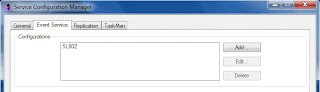
1. Go to Tools -> Configuration Manager and Click New

2. Fill in Configuration Name. You will see this when you login.


alter database [PA_App]
set trustworthy ON;
6. Finally ,don't forget add the configuration name to Service Configuration.

Tuesday, August 30, 2011
Infor SyteLine for Finance Service
Let’s face it, whether you’re a publicly or privately held company today, it’s quite likely that you will need to comply with at least one regulatory agency in order to meet your customers’ needs. Whether it’s ISO, FDA, SOX (Sarbanes Oxley), DOD, etc., you need a system that is robust enough to provide the necessary support features without slowing you down. Infor SyteLine ERP is that system.
So what do you need from an ERP system to provide compliance? I hate to say this, but it depends. It depends on the agency and quite often on your own procedures. Your Financial, Operations, and/or Quality Groups will have to make those determinations depending on your Tier Level (size) and the standards you are planning to comply with. The good news is that most of them have some commonality, so we will cover these here, but please feel free to contact us if you have any questions or additional requirements.
Security – a robust security system is essential. NAV’s role based security really shines here and is easy to maintain. It will allow you to keep your roles clearly defined for even the most stringent SOX auditor.
Change Log – You get to decide what you want to log so that you can fulfill your organization’s audit trail requirements without bogging the system down with unnecessary information. Not only can you meet external requirements, but you can finally find out who changed the customer’s order after you printed the acknowledgement.
XBRL – XBRL can be an important tool in an organization’s efforts to become compliant with the Sarbanes-Oxley Act. It also helps ensure that companies can easily share data with auditors, which can aid in Section 404 compliance as well as create reports simply across systems and even post on the Internet, further informing the public of the current state and changes of the organization, aiding in Section 409 compliance.
Serial and/or Lot Number Tracking – Whether you’re providing traceability for food and drug manufacturing to meet Title 21 CFR Part 11 Compliance, DOD contracts, or any other application where you need to know what was used in the manufacture of a specific item or if you just need to know the serial number as it goes out the door, NAV ERP will do it for you. And you can have it all, Lot and Serial number tracking at the same time, if that’s what you need.
Document Approval – Do you want to speed up your audits? Electronic document approvals can assist you there. No more digging in the storage room for the hard copy files. No more trying to explain lost or misfiled items.
Document Storage – Keep the hard copy files online, so you can pull them up whenever you need them without having to search the files. Whether it’s a vendor invoice, drawing, correspondence, or other documentation, you can have it with a mouse click.
Quality Assurance – Keep track of your inspection records online and have them readily available for reporting and other uses.
Bill of Material and Routing Revision/Version Control – NAV’s revision/version control for BOMs and Routings provides a complete revision history for your Engineering documents. In addition, each production order retains a history of actual material issued, machine usage, etc. as needed for your procedures. You control the level of information you need.
IT Change Control – Do you need help documenting the appropriate procedures to test programming modifications for compliance with FDA, SOX, and other requirements. We’ll be happy to help you develop these to meet your requirements. In addition, Infor Syteline ERP flags all modified code to make it easier to ensure that all documentation has been maintained.
So what do you need from an ERP system to provide compliance? I hate to say this, but it depends. It depends on the agency and quite often on your own procedures. Your Financial, Operations, and/or Quality Groups will have to make those determinations depending on your Tier Level (size) and the standards you are planning to comply with. The good news is that most of them have some commonality, so we will cover these here, but please feel free to contact us if you have any questions or additional requirements.
Security – a robust security system is essential. NAV’s role based security really shines here and is easy to maintain. It will allow you to keep your roles clearly defined for even the most stringent SOX auditor.
Change Log – You get to decide what you want to log so that you can fulfill your organization’s audit trail requirements without bogging the system down with unnecessary information. Not only can you meet external requirements, but you can finally find out who changed the customer’s order after you printed the acknowledgement.
XBRL – XBRL can be an important tool in an organization’s efforts to become compliant with the Sarbanes-Oxley Act. It also helps ensure that companies can easily share data with auditors, which can aid in Section 404 compliance as well as create reports simply across systems and even post on the Internet, further informing the public of the current state and changes of the organization, aiding in Section 409 compliance.
Serial and/or Lot Number Tracking – Whether you’re providing traceability for food and drug manufacturing to meet Title 21 CFR Part 11 Compliance, DOD contracts, or any other application where you need to know what was used in the manufacture of a specific item or if you just need to know the serial number as it goes out the door, NAV ERP will do it for you. And you can have it all, Lot and Serial number tracking at the same time, if that’s what you need.
Document Approval – Do you want to speed up your audits? Electronic document approvals can assist you there. No more digging in the storage room for the hard copy files. No more trying to explain lost or misfiled items.
Document Storage – Keep the hard copy files online, so you can pull them up whenever you need them without having to search the files. Whether it’s a vendor invoice, drawing, correspondence, or other documentation, you can have it with a mouse click.
Quality Assurance – Keep track of your inspection records online and have them readily available for reporting and other uses.
Bill of Material and Routing Revision/Version Control – NAV’s revision/version control for BOMs and Routings provides a complete revision history for your Engineering documents. In addition, each production order retains a history of actual material issued, machine usage, etc. as needed for your procedures. You control the level of information you need.
IT Change Control – Do you need help documenting the appropriate procedures to test programming modifications for compliance with FDA, SOX, and other requirements. We’ll be happy to help you develop these to meet your requirements. In addition, Infor Syteline ERP flags all modified code to make it easier to ensure that all documentation has been maintained.
Monday, August 29, 2011
Syteline ERP for Job Shop Manufacturing
Syteline ERP for Job Shop Manufacturing
What is Job Shop Manufacturing?
1. Manually Create Job
2. Create Job BOM
3. Print Job Paperwork
4. Record Job Material Transactions
5. Record Job Operation Transactions
6. Backflush Transactions
7. Outside Operations
8. Job Lot splitting
9. Rework Jobs
10. Kit Items
11.Reverse Backflushing
What is Job Shop Manufacturing?
1. Manually Create Job
2. Create Job BOM
3. Print Job Paperwork
4. Record Job Material Transactions
5. Record Job Operation Transactions
6. Backflush Transactions
7. Outside Operations
8. Job Lot splitting
9. Rework Jobs
10. Kit Items
11.Reverse Backflushing
Syteline ERP for Education
Syteline ERP for Education
The promise of enterprise resource planning (ERP) software is that it should create greater efficiencies in your business operations, producing genuine cost savings and an attractive return on investment (ROI) within a reasonable timeframe.
Simply selecting the right software at the right price, however, is not enough to realize these business benefits. There are costs beyond software licensing and deployment that many IT buyers neglect to factor into their budgets – until it’s too late. These overlooked costs can delay and diminish your expected ROI, or worse, make the project a net loser altogether.
How do you protect yourself and your company from being blindsided by unexpected budget-busting costs?
Cover all your bases upfront. As you establish your budget and evaluate proposals from ERP vendors, include in your analysis, these often overlooked costs of ERP.
1. Training
Your new system is up and running, but it’s worthless unless employees are comfortable using it. How much training time is required to equip your employees to maximize the system? Keep in mind that the more difficult the software is to use, the more expensive it will be to get your employees up to speed on it. Therefore, factor in “ease-of-use” in your software selection. Consider also the cost of productivity loss by taking employees away from their core work to learn the new system.
2. Data Migration/ Conversion
When you purchase new ERP software, you have the costs of moving vast amounts of important business data, often from disparate systems across your organization, into a new system. The data transfer may require weeks, even months, to complete, including time to scrub the data – to delete obsolete, unnecessary, and damaged data. How much will the data conversion cost? Will there be downtime associated with the data transfer and how much will that disruption cost?
3. Business Disruption
How long and when will your system be down during ERP deployment? What will that downtime cost the company in lost revenue and employee productivity? Have you planned ahead to minimize the impact – and cost – of the disruption to your operations?
4. Unexpected Customization
Even the most robust out-of-the-box ERP functionality might need to be customized to fit your business. What capabilities do you need added or tailored? Address these possibilities upfront, when you can plan for the costs and have better control over them, versus during mid-deployment.
5. Redefining Business Processes
An option to customization is to adjust business processes to fit the new ERP system. This, however, still has costs associated with it in terms of training (to acclimate employees to the new processes), productivity loss during the training period, and overall disruption to the business caused by implementing new processes.
The promise of enterprise resource planning (ERP) software is that it should create greater efficiencies in your business operations, producing genuine cost savings and an attractive return on investment (ROI) within a reasonable timeframe.
Simply selecting the right software at the right price, however, is not enough to realize these business benefits. There are costs beyond software licensing and deployment that many IT buyers neglect to factor into their budgets – until it’s too late. These overlooked costs can delay and diminish your expected ROI, or worse, make the project a net loser altogether.
How do you protect yourself and your company from being blindsided by unexpected budget-busting costs?
Cover all your bases upfront. As you establish your budget and evaluate proposals from ERP vendors, include in your analysis, these often overlooked costs of ERP.
1. Training
Your new system is up and running, but it’s worthless unless employees are comfortable using it. How much training time is required to equip your employees to maximize the system? Keep in mind that the more difficult the software is to use, the more expensive it will be to get your employees up to speed on it. Therefore, factor in “ease-of-use” in your software selection. Consider also the cost of productivity loss by taking employees away from their core work to learn the new system.
2. Data Migration/ Conversion
When you purchase new ERP software, you have the costs of moving vast amounts of important business data, often from disparate systems across your organization, into a new system. The data transfer may require weeks, even months, to complete, including time to scrub the data – to delete obsolete, unnecessary, and damaged data. How much will the data conversion cost? Will there be downtime associated with the data transfer and how much will that disruption cost?
3. Business Disruption
How long and when will your system be down during ERP deployment? What will that downtime cost the company in lost revenue and employee productivity? Have you planned ahead to minimize the impact – and cost – of the disruption to your operations?
4. Unexpected Customization
Even the most robust out-of-the-box ERP functionality might need to be customized to fit your business. What capabilities do you need added or tailored? Address these possibilities upfront, when you can plan for the costs and have better control over them, versus during mid-deployment.
5. Redefining Business Processes
An option to customization is to adjust business processes to fit the new ERP system. This, however, still has costs associated with it in terms of training (to acclimate employees to the new processes), productivity loss during the training period, and overall disruption to the business caused by implementing new processes.
Subscribe to:
Posts (Atom)

-
https://stackoverflow.com/questions/39153581/how-do-you-change-session-timeout-in-iis-8-5
-
วิธี การ Maintenance SQL Server 2005 | Maintenance SQL Server 2008 | SQL 2005 Express | Sql management Studio How to SQL Server Maintenance...
-
Google turns off GMail data feed to sites like Facebook GMail contacts will no longer be automatically handed over to other websites and ser...
